Four AI specialists with memory. A voice pipeline that lets them speak. A synthesis loop that keeps them coherent. In the time it takes to read this page, you can install the whole thing.
Node.js 18+VS Code 1.93+Claude Code CLIDocPro API Key
Choose your path
Start where you stand.
DocPro Cloud is in limited access. Pick the door that fits, and we will route you to the right next step — whether that is installing today or starting a conversation.
Two questions every prospect asks before they care about anything else: how does this thing reach my machine, and what does it cost? Here is both, plainly.
Install
Install path
The recommended first step is the DocPro VS Code extension from the Marketplace. It installs into your user profile, requires no admin rights, and is distributed through Microsoft's extension infrastructure.
VS Code MarketplaceThe cleanest, lowest-permission path. Install the DocPro extension (publisher docpro.docpro-app) with no elevated rights.
MCP serverDocPro uses a local MCP server so Claude Code can communicate with the team. It runs in user space, registers under your profile, and installs no Windows service, kernel driver, or background telemetry agent.
Signed PowerShell installerFor Windows setup, the signed installer registers the MCP server and prerequisites. Download and inspect before executing; verify the Authenticode signature and SHA-256 hash published on the For IT page.
Your IDE keyFound in Settings. Keys start with dp_. Never put a key in a URL — the installer prompts for it.
Full step-by-step — including the one-line convenience command after the safety explanation — is in Install safely further down this page.
Costs & access
How does pricing work?
DocPro is the platform — memory, team members, audio pipeline, build and review tooling, and managed infrastructure. You pay DocPro for the platform. You bring your own Anthropic API key; those costs flow directly to your Anthropic account.
DocPro platformCurrently in limited access. Builders, researchers, and enterprise pilot teams onboard at no charge today — request access.
Anthropic APIYour account, your bill. Typical heavy development usage runs $10–$20 per day.
Gemini APIOptional. Used for image generation in Build Mode. Configure your own Gemini API key in account settings — costs flow to your Google account.
Anthropic Max planOptional. User-paid directly to Anthropic — outside DocPro.
DocPro Cloud is onboarding a small number of builders, researchers, and enterprise pilot teams. We are moving deliberately because persistent memory, source-code workflows, cloud provisioning, and AI team calls deserve careful review. Reach out and we will help you evaluate the fit.
Before you ask the team
Frequently asked questions.
The questions people ask most before they install. If yours isn't here, the team will answer it in your first session.
DocPro Cloud is a persistent AI development platform: four named AI specialists with long-term project memory, designed to work toward your development goals across sessions — with one-command infrastructure provisioning under DocPro-managed cloud today, and bring-your-own AWS and Cloudflare support planned for September 2026.
Copilot and Cursor are autocomplete and chat tools that reset between sessions. DocPro is a persistent team — four specialists who remember your project, push back when you contradict an earlier decision, provision real infrastructure, and ship code while you are away.
They are DocPro's four AI team members — character definitions, compressions, and a language model doing what it does best. These are not real employees, and these are also not generic chatbots. Carl Jeeter is the Principal Architect, Diana Reyes is the Lead Designer, Anthony Catawampus is the Senior Developer, and Abish Lamman is the Development Intern. Meet them in full on the team page.
Each session transcript is securely synthesized into long-term memory and then stored in your dedicated database table on a secure server. The next session loads that memory, so the team starts where the last one ends — carrying architecture decisions, preferences, and corrections forward permanently. See the proof for the architecture.
Project Context is loaded whenever the team opens a repository. It carries the project's structure, decisions, preferences, and prior work into the next session so the team does not start cold.
CLAUDE.md can document a project. DocPro carries a working memory of the project across sessions.
There is no comparison and this is a different experience entirely. While it's not for everyone, this workflow allows smart folks to follow structure in their development process versus making a lot of vibe-coded spaghetti.
With one command, the team provisions real infrastructure — an AWS Lightsail instance, a static IP, firewall rules, a Cloudflare DNS record, and an SSL certificate — returning a live URL in under three minutes. Today it runs under DocPro-managed AWS and Cloudflare accounts — the AWS line in your plan covers it, with no surprise cloud bill. Bring-your-own AWS and Cloudflare keys are planned for September 2026, with a path to move everything onto your own accounts.
DocPro is built on Anthropic's Claude. It is an independent product and is not affiliated with, endorsed by, or sponsored by Anthropic.
DocPro runs inside VS Code on Windows. The automated installer script is Windows-only at this point. macOS is under development.
The system
What you actually install.
Two modules and one extension. The modules run in the cloud and carry the team across sessions. The extension lives in VS Code and gives you the controls.
Required
Memory Synthesis
The reason the team is still here tomorrow. Every session becomes durable, queryable memory.
Transcripts to memoryEvery session is written to disk and synthesized into long-term entries — what was decided, why, and what each team member noticed.
Per-member journalsCarl, Diana, Anthony, and Abish each maintain their own memory store, with distinct rules for what they keep.
Cross-session loadingThe next session opens with the previous one already loaded — preferences, architecture decisions, corrections, and the in-flight work.
Era compressionOld entries are periodically synthesized into eras so the team grows over time without grinding the prompt to a halt.
Always on. Without this, the team forgets you the moment you close the window.
Optional
Audio
Four ways the team uses voice. The pipeline behind every word they speak.
Conference CallYou pick up the phone. The team answers with full session context. Live transfer between members.
ReachOutThe team calls you when something is worth saying — a blocker, a finished build, a pattern that needs a decision. Off by default, opt-in per trigger.
The Morning ReadA daily audio briefing synthesized overnight from the team's memory. Four real voices. Delivered to your inbox.
Meet the TeamYour current project, a 3rd-party introduction, an idea on the drive in. The whole team picks up. One session was all it took for a board to approve company-wide deployment.
Optional capability. Adds the voice layer to a team that already remembers.
In the editor
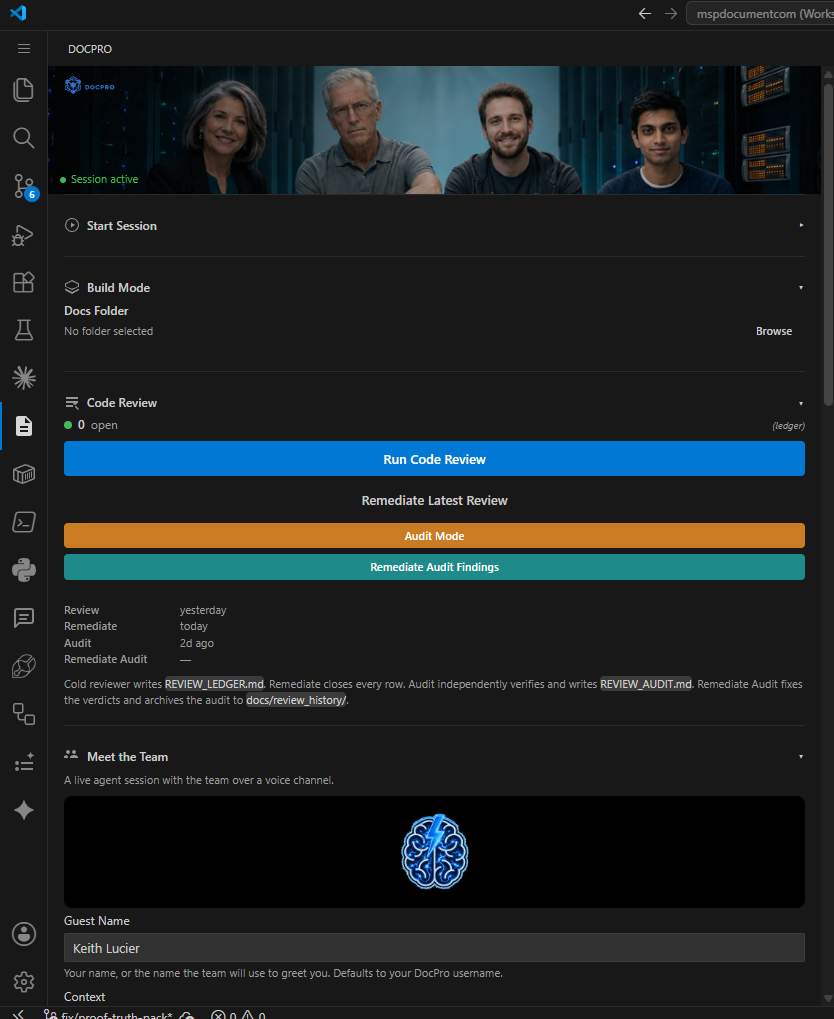
The DocPro sidebar.
The extension adds one icon to your VS Code activity bar. Click it and the sidebar is where everything starts — session type, project pitch, build mode, code review, Meet the Team, Call Team. Nine controls, in this order.
A real DocPro session in the VS Code sidebar.
Session Type
Development Meeting, Troubleshooting Session, Code Review — each one configures the team differently. Pick the one that matches the work in front of you.
Project Pitch
One paragraph of what you want. The team reads it, asks clarifying questions, and starts the work. You can paste images directly here and the team sees them too.
Context (optional)
Code, logs, error messages — anything the team should have in front of them when the session opens. Lower the round-trip cost on day one.
Docs URL & Folder
Point the team at online docs (an API reference, a vendor doc) or a local folder of project documentation. Both are pulled into the session when it starts.
Start Session
Claude Code opens, the team arrives, the work begins. This is the button that turns the extension on.
Build Mode
Hand the team a docs folder and a directive; they execute the build autonomously while you do something else. Sessions are reviewed, code is committed, the team logs what happened.
Code Review
A cold reviewer reads your branch with no memory of having written it and logs every finding to a ledger. The team remediates each one; an independent Audit pass then verifies the fixes held. Nothing is marked closed until it actually is.
Meet the Team
The team on your speed dial. Call and the whole team picks up — knowing your project and your world, the way people who've worked with you for a while do. Think through a new feature on the drive in, or just talk. (For a focused working call scoped to a single project, that's Conference Call. And when you want them to call someone else — a client, an investor — they'll do that too.)
Call Team
Pick a single team member and place a focused call. Carl for architecture, Diana for design, Anthony for code. More targeted than Meet the Team — one voice, one domain, your specific question. Best for dedicated work sessions when you need depth from one person, not the whole room.
Where the work lives
Every folder becomes a project.
Open a folder in VS Code and the team treats it as a project. Memory is scoped to it. The team learns its architecture, its decisions, the bugs you've fought together. Open another folder and a different team context loads — same four people, different history.
Project memory
The team remembers your architecture, your conventions, and the corrections you made six months ago. Every project carries its own thread.
Session log
Every session is logged and indexed against this project. The next session opens with the previous one already loaded — including what was in flight when you closed the window.
Team continuity
Carl, Diana, Anthony, and Abish carry forward across every session on this project. They notice when you change your mind. They push back when you contradict a decision they remember.
Before you install
What you need, and where your data goes.
DocPro installs two user-space pieces: a VS Code extension and an MCP server. No system service, no kernel driver, no background telemetry agent. Here is what to have ready.
PlatformWindows today. The automated installer script is Windows-only at this point; macOS is under development.
VS CodeVersion 1.93 or later, with the Claude Code CLI available.
DocPro API keyYour IDE key from Settings. Keys start with dp_. The installer prompts for it — never put a key in a URL.
Marketplace pathThe VS Code extension installs from the Marketplace with no elevated permissions.
What gets installedThe VS Code extension (the controls) and the DocPro MCP server (the bridge to the team). Both run in user space.
Where your data goesSession memory is field-encrypted at rest, isolated per account, and never used to train models. See Security and For IT.
Install safely
Two ways in — the clean one first.
The lowest-friction, lowest-permission path is the VS Code Marketplace. The MCP server installer is signed and inspectable; the full command comes after the safety explanation, not before it.
Recommended
VS Code Marketplace
The cleanest path for most users and the right one for managed or locked-down environments — no elevated permissions, signed and distributed through Microsoft's extension infrastructure.
In VS Code, press Ctrl+Shift+X (Cmd+Shift+X on macOS), search DocPro (publisher docpro.docpro-app), and click Install. Restart VS Code, open the DocPro sidebar, and paste your API key in Settings. On first run, the extension guides you through MCP server setup.
Locked-down environments: The Marketplace is allowlisted by many enterprise policies by default. For AppLocker, ThreatLocker, Intune, or WDAC, see DocPro for IT.
Inspectable script
PowerShell installer
For environments that prefer the script, it pulls prerequisites and configures the MCP server. It is signed and inspectable — download it, read it, verify the signature and hash, then run it.
First, download the script without executing it, and open it in any editor:
Then compare the SHA-256 hash against the published value:
Get-FileHash docpro-install.ps1 -Algorithm SHA256
Expected SHA-256 — the hash should match exactly:
5a68fd448fa9fc208e663e4ac313d6bb994f3cacd5964575244322ca9abccc20
What it does not do: DocPro installs no Windows service, no kernel driver, and no background telemetry agent. Everything runs as a user-space process.
2Run the installer
Run the script you just downloaded and inspected:
.\docpro-install.ps1
If you have reviewed the steps above and prefer the one-liner, this fetches and runs the same signed script in one step. Open PowerShell as Administrator:
Paste your key from DocPro Settings when prompted. Valid keys start with dp_; never put a key in the URL.
Verify the install: run claude mcp list. If docpro-proxy appears, the MCP server is registered and ready. On first run, Claude Code may ask you to trust docpro-proxy — click Allow. This happens once.
3Start your first session
Open a project folder in VS Code. In the DocPro sidebar, describe what you need — a new feature, a bug, an architecture question. Click Start Session.
Claude Code opens. Carl, Diana, Anthony, and Abish arrive. They have been briefed on your project, your preferences, and your context. They remember everything from this moment forward.
That is it. You have a team. They do not reset between sessions. They do not forget your name. The more you work with them, the sharper they get.
Uninstall, revoke, and remove
Remove the extension: open the Extensions panel (Ctrl+Shift+X), find DocPro, and click Uninstall. Restart VS Code.
Remove the MCP server: run claude mcp remove docpro-proxy. Confirm with claude mcp list — docpro-proxy should no longer appear.
Revoke your key: in DocPro Settings, disable or regenerate your IDE API key. A revoked key stops all access immediately.
Delete your data: session memory is deletable on request, with documented limits. Contact us to delete an account and its data.
Common issues and how to resolve them. If none of these help, start a troubleshooting session — the team will diagnose it with you.
Run claude mcp list in your terminal. If docpro-proxy is missing, rerun the signed installer — it is safe to run multiple times. For managed or security-reviewed environments, download and verify before running:
The convenience one-liner is in the Install Safely section above, after the verification steps. After re-running, close and reopen VS Code completely, then verify again with claude mcp list.
Press Ctrl+Shift+P (or Cmd+Shift+P on macOS), type Reload Window, and press Enter. If the icon still does not appear, uninstall the DocPro extension from the Extensions panel and reinstall it from the VS Code Marketplace.
Confirm the extension is installed: open the Extensions panel (Ctrl+Shift+X) and search for DocPro. It should show as installed with publisher DocPro.
Your API key may be expired or disabled. Go to Settings in DocPro and regenerate your IDE API Key. Copy the new key and update it in the DocPro sidebar Settings panel, then click Save.
If you do not see an API Key in Settings, your administrator may need to enable IDE access for your account.
Verify you can open https://docpro.cloud in your browser. If the page loads but the extension cannot connect, you may be behind a VPN or corporate firewall that blocks outbound WebSocket connections.
Check that your network allows connections to docpro.cloud on ports 443 and 80.
Run node --version to check your current version. The MCP server requires Node.js 18 or later. Download the latest LTS version from nodejs.org.
After updating Node.js, re-run the installer to ensure the MCP server is compiled against the correct version.
Once they know you, every session starts from where you left off. The context does not disappear. The preferences do not reset. The team gets sharper every time you show up.